


Dehancer Review: Is This the Best Cinematic Film Emulation Plugin?


Film emulation plugins are everywhere right now. Some look good. Some look trendy. Very few actually feel like film.
In my latest deep-dive review, I put Dehancer through a serious test — not just casual presets and quick LUT swaps, but real-world grading scenarios, side-by-side comparisons, and careful analysis of what it’s actually doing under the hood.
⸻
What Makes Dehancer Different?
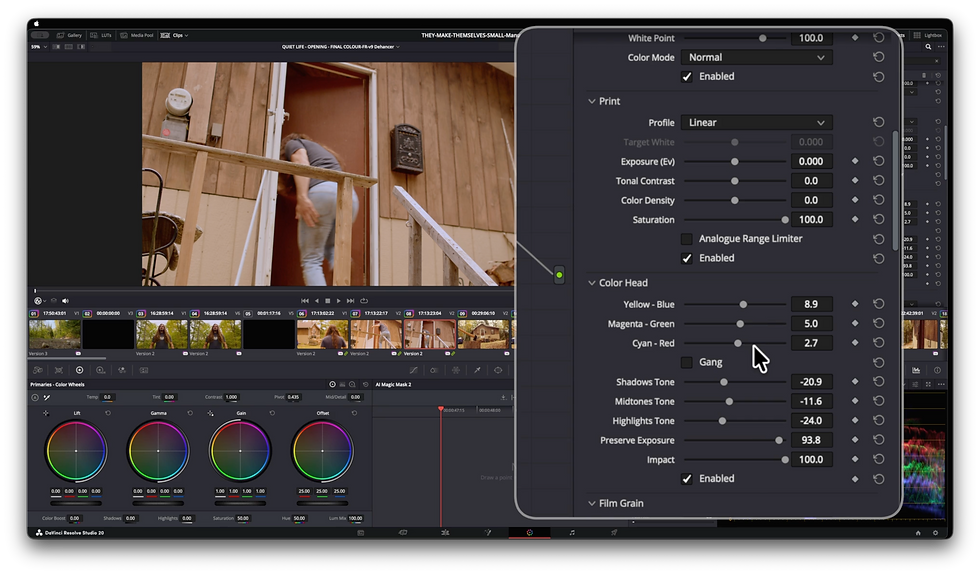
Dehancer isn’t just a color preset tool. It’s built around a full film pipeline simulation:
• Film stock emulation (negative and print)
• Film grain modeled per stock
• Halation
• Bloom
• Gate weave
• Film compression and tonal mapping
• Expand / print profiles
Instead of “slap on a LUT and adjust,” Dehancer tries to simulate how film behaves as a system — from capture to print.
That’s a very different philosophy from most plugins.

How It Performs in Practice
In the review, I break down:
• How accurate the film stocks actually look
• Whether it holds up against competitors
• How flexible it is for different cameras
• Where it shines
• Where it might slow you down
• And whether it’s worth the cost
If you’re serious about cinematic color, this is the kind of plugin you need to evaluate carefully. Film emulation can either elevate your footage — or flatten it into a gimmick.
Who Is Dehancer For?
Dehancer makes the most sense for:
• Cinematographers who want a filmic finish inside Resolve, FCP, or Premiere
• Indie filmmakers who don’t want to rely on generic LUT packs
• YouTube creators looking for a refined cinematic look
• Colorists who want more than “teal and orange”
If you care about highlight roll-off, density, halation behaviour, and tonal separation — you’ll understand what this plugin is trying to do.
Get 10% Off Dehancer

If you decide to try Dehancer, you can get 10% off any tier!
Use my code:
DHSTUDIOS
That applies to any version, any tier, any pricing model — Resolve, Final Cut, Premiere, or photo editions.
Watch the Full Review
I go much deeper in the video, with real examples and practical grading insights:
If you’re building a serious color workflow, this is one worth watching all the way through.
Let me know what you think — and if you’re using Dehancer already, I’d be curious what stock profiles you gravitate toward most.
— J Dahl

Comments